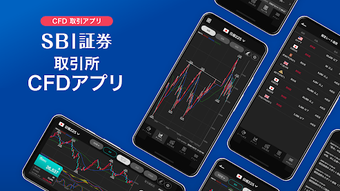

Download SBI証券 取引所CFD アプリ – SBI証券, 取引所CFD, CFD取引, トレードアプリ, モバイルトレード, クイック365, リアルタイムチャート, モバイル投資
Overview
The SBI証券 取引所CFD アプリ is a mobile trading application developed by SBI Net Bank, designed to facilitate quick and intuitive Contracts for Difference (CFD) trading through the Quick365 platform. This application is tailored for users seeking efficient access to exchange-based CFD trading, offering a streamlined interface optimized for on-the-go market participation. It enables users to execute new, settlement, and Doten orders with a single tap, leveraging a high-speed order function to minimize delays during fast-moving market conditions.
The app supports real-time market data, news updates, and alerts, ensuring users remain informed while making trading decisions. It is available on both iOS and Android platforms, making it accessible to a broad range of mobile users. The target audience includes retail investors, active traders, and individuals interested in leveraging CFD instruments for speculative or hedging purposes.
The application is free to download and use, with no upfront cost for access to core trading functions. However, users must agree to the app’s terms and conditions before activation. It is important to note that certain critical information, such as important trading notices, is not accessible within the app and requires users to log in via the web platform.
The developer did not provide additional system requirements or details about the underlying trading infrastructure.
Key Features & Capabilities
- One-Tap Order Execution: The app allows users to place new, settlement, and Doten orders with a single tap, significantly reducing the time required to enter trades. This feature is particularly beneficial during volatile market conditions where speed can impact trade outcomes.
- Real-Time Charting Functionality: Users can access interactive charts that support both portrait and landscape orientations. Market orders can be placed directly on the chart, enabling visual-based trading strategies.
- Advanced Technical Analysis Tools: The application includes 12 built-in technical indicators and trendline drawing functions, supporting multi-analysis charting for in-depth market trend evaluation.
- Real-Time Market Data and Alerts: Traders receive live updates on price movements, news, and customizable alerts, helping them stay responsive to market developments.
- Mobile-First Design: The interface is optimized for touch-based navigation, with a focus on usability and accessibility for beginners and intermediate users.
These capabilities collectively support a dynamic trading workflow, allowing users to analyze market conditions, visualize trends, and execute trades swiftly from a mobile device. The integration of chart-based order placement enhances precision for technical traders, while the one-tap execution feature lowers the barrier to entry for new users. The app’s focus on speed and clarity makes it suitable for both day traders and those managing positions remotely. However, the developer did not specify whether the charting tools support advanced features like drawing Fibonacci retracements or custom scripts.
User Interface, Workflow & Performance
The SBI証券 取引所CFD アプリ features a clean, mobile-optimized interface designed for ease of navigation and rapid access to core functions. The layout prioritizes key trading actions, such as order placement and chart viewing, placing them within immediate reach of the user. Navigation is structured around a bottom tab bar, with clearly labeled sections for trading, charts, market news, and account management.
The app supports both portrait and landscape modes, allowing users to adjust their viewing preferences based on device orientation and trading style. Workflow efficiency is enhanced by the one-tap order function, which reduces the number of steps required to initiate a trade. Users can switch between different chart types and apply technical indicators with minimal interaction.
The developer did not specify resource usage details, such as CPU or RAM consumption, nor did they provide performance benchmarks. General software behavior patterns suggest that the app operates smoothly on modern smartphones, but exact performance observations are based on typical mobile application behavior. Stability and responsiveness are expected to be consistent with standard mobile trading applications, though no user-reported crash rates or update logs were provided.
Compatibility & System Requirements
The SBI証券 取引所CFD アプリ is compatible with iOS and Android operating systems, as stated in the provided information. The application has a file size of 42.1 MB, indicating a lightweight installation that should not significantly impact device storage. The version number is 1.0.1, suggesting an early release with potential for future updates.
The developer did not specify minimum hardware requirements, such as processor speed, RAM, or screen resolution. Exact system requirements were not listed. It is also unclear whether the app supports older versions of iOS or Android.
Compatibility information was partially provided, and users are advised to check their device’s app store for the latest compatibility details. The app is available for free download on both the Apple App Store and Google Play, with no additional fees for basic functionality.
Pros and Cons
Pros
- Free to download and use with no subscription fees.
- One-tap order execution enhances speed and convenience for active traders.
- Real-time charting with support for multiple orientations improves usability.
- Includes 12 technical indicators and trendline tools for technical analysis.
- Mobile-optimized interface suitable for beginners and experienced users.
Cons
- Important trading notices are not accessible within the app; users must visit the web platform.
- Developer did not provide detailed system requirements or performance metrics.
- Limited access to advanced charting features such as custom scripts or Fibonacci tools (if not included).
- App availability is restricted to iOS and Android, with no support for desktop platforms.
- Real-time data and alerts are dependent on network connectivity.
FAQ Section
Is the SBI証券 取引所CFD アプリ available for free?
Yes, the app is free to download and use. There are no charges for accessing core trading features.
Which operating systems does the app support?
The app is available for iOS and Android devices. No other platforms are currently supported.
Can I use the app without an internet connection?
Basic navigation may be possible offline, but real-time market data, order execution, and alerts require an active internet connection.
Are there any in-app purchases or subscription fees?
No, the app is free to use with no in-app purchases or subscription models.
How often is the app updated?
The app is updated regularly to ensure optimal performance and security, though the frequency of updates was not specified.
Final Thoughts + CTA
The SBI証券 取引所CFD アプリ presents a compelling option for traders seeking a fast, intuitive mobile solution for CFD trading on the Quick365 platform. Its one-tap order function, real-time charting, and technical analysis tools offer a robust foundation for both novice and experienced users. The free access model and mobile-first design make it particularly accessible.
However, the lack of access to important trading notices within the app and the absence of detailed system requirements may pose challenges for some users. Despite these limitations, the app delivers a streamlined, efficient trading experience tailored for on-the-go participation. For individuals focused on mobile trading, real-time analysis, and quick execution, this application stands out as a practical choice.
Download SBI証券 取引所CFD アプリ now to experience fast, secure, and intuitive CFD trading on your smartphone.





.png)

